

When three or more people join a video call, something has to manage all those audio and video streams. One of the oldest ways to do that is a Multipoint Control Unit, or MCU.
In this guide I’ll explain in plain language what an MCU does, where it’s still useful, and why most modern video apps have moved to a different design called an SFU.
What is a multipoint control unit?
A multipoint control unit (MCU), sometimes called a multipoint conferencing unit, is a server that connects several participants in one video or audio conference. Its key job is mixing: it takes everyone’s video and audio and combines them into a single stream.
Think of it like a TV studio control room. Every camera sends its feed in, the control room arranges them into one picture, and viewers at home receive just that one finished picture.
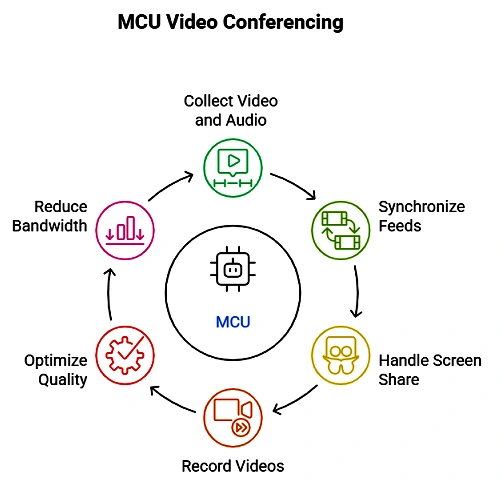
How an MCU works, step by step
- Each participant sends one stream of video and audio to the MCU.
- The MCU decodes every incoming stream.
- It mixes the video into one layout, such as a grid or a speaker view.
- It mixes the audio into one track, leaving out each person’s own voice so they don’t hear an echo.
- It re-encodes the result and sends each participant a single combined stream.
Because each device only receives one stream, the work on the participant’s side is very light.
MCU pros and cons
| Pros | Cons |
|---|---|
| Low bandwidth and processing needed on each participant’s device | Very high processing load on the server, so it’s expensive to scale |
| Works well with older or low-power devices | Adds delay (latency) because every stream is decoded and re-encoded |
| One consistent layout for everyone | Participants can’t choose their own layout |
| Easy to record or broadcast as one stream | End-to-end encryption isn’t possible, because the server must decode the media |
MCU vs SFU: what’s the difference?
Most modern video apps use a Selective Forwarding Unit (SFU) instead.
| MCU | SFU | |
|---|---|---|
| What the server does | Decodes, mixes and re-encodes | Forwards streams without decoding |
| Streams each participant receives | One mixed stream | Several separate streams |
| Server cost | High | Lower |
| Delay | Higher | Lower |
| Layout | Set by the server | Chosen by each participant’s app |
| End-to-end encryption | Not possible | Possible |
In short: an MCU does the heavy lifting on the server, while an SFU shares the work with each participant’s device. As internet speeds and devices have improved, SFUs have become the standard for most video conferencing.
Where MCUs are still used
MCUs haven’t disappeared. They’re still useful for:
- Connecting older systems, such as traditional meeting-room hardware or phone dial-ins that can only handle one stream
- Audio-only conference calls, where mixing audio is cheap
- Live streaming, when a meeting has to be sent to YouTube or another platform as a single stream
- Recording, since one mixed file is easier to store and share
Many modern platforms add MCU-style mixing on top of an SFU just for these jobs.
Should your business care?
If you’re choosing a video conferencing tool, you don’t need to pick an MCU or SFU yourself. The provider handles it. What matters is the result: good quality on weak connections, low delay, recording options, and whether the tool supports end-to-end encryption if privacy is important to you.
Frequently asked questions
Is an MCU hardware or software? Both exist. Early MCUs were dedicated hardware boxes. Today, most are software running on servers or in the cloud.
Does Zoom use an MCU? Popular platforms like Zoom, Google Meet and Microsoft Teams mainly use SFU-style designs. They may use mixing for specific jobs such as phone dial-in or recording.
Why is it called “multipoint”? Because it connects multiple points (participants or locations) in one conference, as opposed to a simple point-to-point call between two people.
Related guides on WebTechHelp
- How to use FaceTime on Android
- Metastream: How to Watch Videos Together Online (and the Best Alternatives)
- How to choose the right broadband connection
Sources
- WebRTC Glossary (BlogGeek.me): MCU
- Digital Samba: Understanding Multipoint Control Units