Gimkit is a classroom quiz game with a twist: every correct answer earns you in-game money, and you spend that money on upgrades and power-ups to earn even more. It feels more like a strategy game than a test, which is why so many students ask for it.
If you’ve already joined a game and want to know what you’re actually doing, this guide is for you. I’ll explain how a Gimkit game works, how to earn and spend cash, the main game modes, KitCollab, and what you get for free compared with Gimkit Pro. If you just need to get in, my guide on how to join a Gimkit game with a code covers that.
How a Gimkit game works
- A teacher builds a kit, which is a set of questions, or picks one from the library.
- They choose a game mode and start a live game.
- Students join on their own devices with a code and a nickname. No account is needed.
- Everyone answers questions at their own pace. Questions repeat, so you get chances to learn the ones you missed.
- Correct answers earn in-game cash. Wrong answers usually cost a little.
- The game ends when the timer runs out or someone reaches the goal the teacher set.
Gimkit was started by Josh Feinsilber, who began it as a high school project.
Earning and spending cash
In Classic mode and many others, the shop is where strategy comes in. You’ll find upgrades such as:
- Money per question: increases how much each correct answer earns
- Streak bonus: extra cash for answering several in a row correctly
- Multiplier: multiplies your earnings
- Insurance: reduces how much you lose for a wrong answer
There are also power-ups. Some help you, and in some modes others affect opponents.
My tip: early in a game, spend on money per question and streak bonus before anything else. They pay back quickly. Then focus on answering carefully, because a long streak is worth more than speed.
The main Gimkit game modes
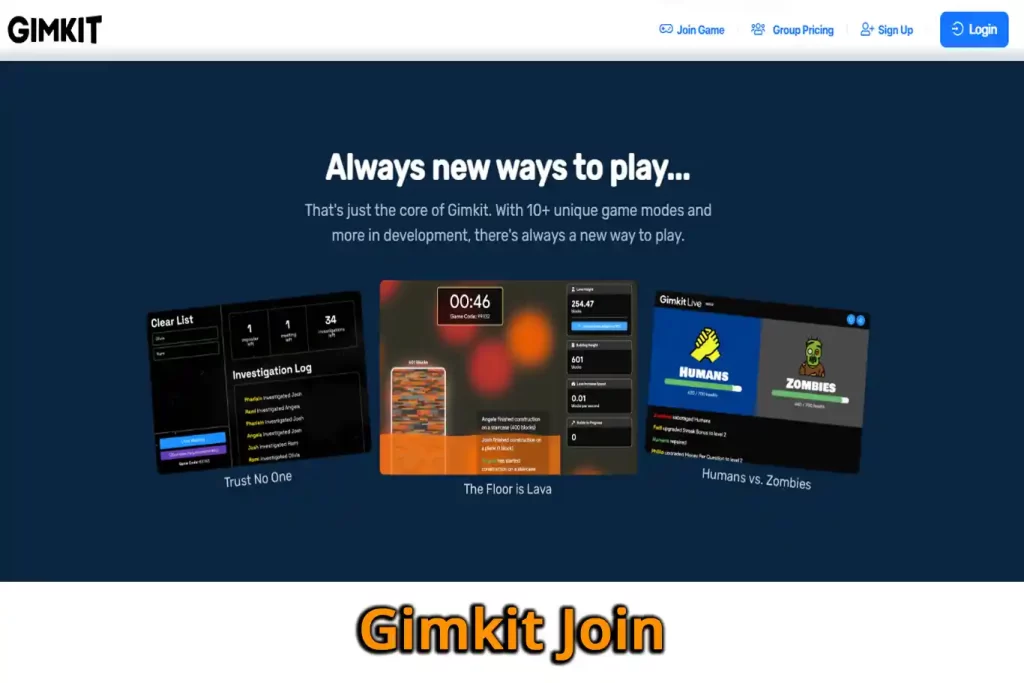
Gimkit regularly adds and rotates modes, so your teacher’s list may look different. These are some of the best known:
| Mode | How it plays |
|---|---|
| Classic | Answer questions, earn cash, buy upgrades. The original mode. |
| Team Mode | Like Classic, but teams share one bank account. |
| Trust No One | A social deduction game: crewmates answer questions to find the hidden impostors. |
| Don’t Look Down | A platformer where answers give you energy to climb a tricky map. |
| Fishtopia | Explore islands, catch and sell fish, and unlock new areas. |
| Capture the Flag | Team territory game where answers give energy to move and grab the other team’s flag. |
| Snowbrawl | A team snowball battle powered by correct answers. |
| One Way Out | A team escape game where answers earn gear. |
| The Floor Is Lava | A team game where correct answers build upward before the lava rises. |
Several of these are 2D modes, where you move a character around a map. According to one 2026 guide, those modes allow up to 60 players.
KitCollab: students write the questions
KitCollab lets students submit their own questions during a session. The teacher approves, edits or rejects each one, and the approved questions become a kit the class can then play. It’s a great way to get students thinking about a topic before the game even starts.
Homework (assignments)
Teachers with Gimkit Pro can set assignments: games students play on their own, outside class, until they reach a cash goal or accuracy target. It turns homework practice into a game while still giving the teacher a report.
Is Gimkit free? Basic vs Pro
Gimkit has a free Basic plan and a paid Pro plan.
- Basic (free): create kits and host live games, but only with a rotating selection of game modes (usually a few at a time).
- Pro: all game modes, assignments, and more features. One October 2026 guide lists it at around $14.99 a month or $59.88 a year, with a 14-day free trial. Check Gimkit’s site for current pricing.
Students never pay. They can always join a game for free.
Tips for students
- Read the question fully before tapping. Wrong answers cost money.
- Build a streak. It’s usually the fastest way to grow your cash.
- Don’t fall for “free cash” or “hack” sites. Scripts that promise unlimited money break the game’s rules, can get you removed by your teacher, and some carry malware.
Tips for teachers
- Start with Classic so students learn the shop before trying team or 2D modes.
- Use a goal instead of a timer if you want everyone to keep going until the class reaches a target.
- Keep kits focused: 10 to 25 questions on one topic works well, because questions repeat.
- Try KitCollab as a revision activity, then play the kit the next lesson.
If you’re choosing between classroom game tools, see my comparison of Kahoot vs Gimkit vs Blooket vs Wayground.
Frequently asked questions
How do you win at Gimkit? It depends on the mode, but in Classic you win by earning the most cash. Upgrade early, keep a streak and avoid careless mistakes.
Is Gimkit free for students? Yes. Students join for free with a code. Only teachers choose between Basic and Pro.
What is KitCollab in Gimkit? A feature that lets students submit questions for a kit, which the teacher approves before the class plays it.
Can you play Gimkit alone? Yes, through a homework assignment your teacher sets, if they have Gimkit Pro.
Related guides on WebTechHelp
- Gimkit Join: how to join a game with a code
- Blooket Join explained
- Qiuzziz (Quizizz, now Wayground): how to join and use it
Sources
- Upstate House: Gimkit mastery: the ultimate teacher’s guide (October 2026)
- Gimkit Info: All Gimkit game modes explained (updated July 2026)
- Gimkit: Official website