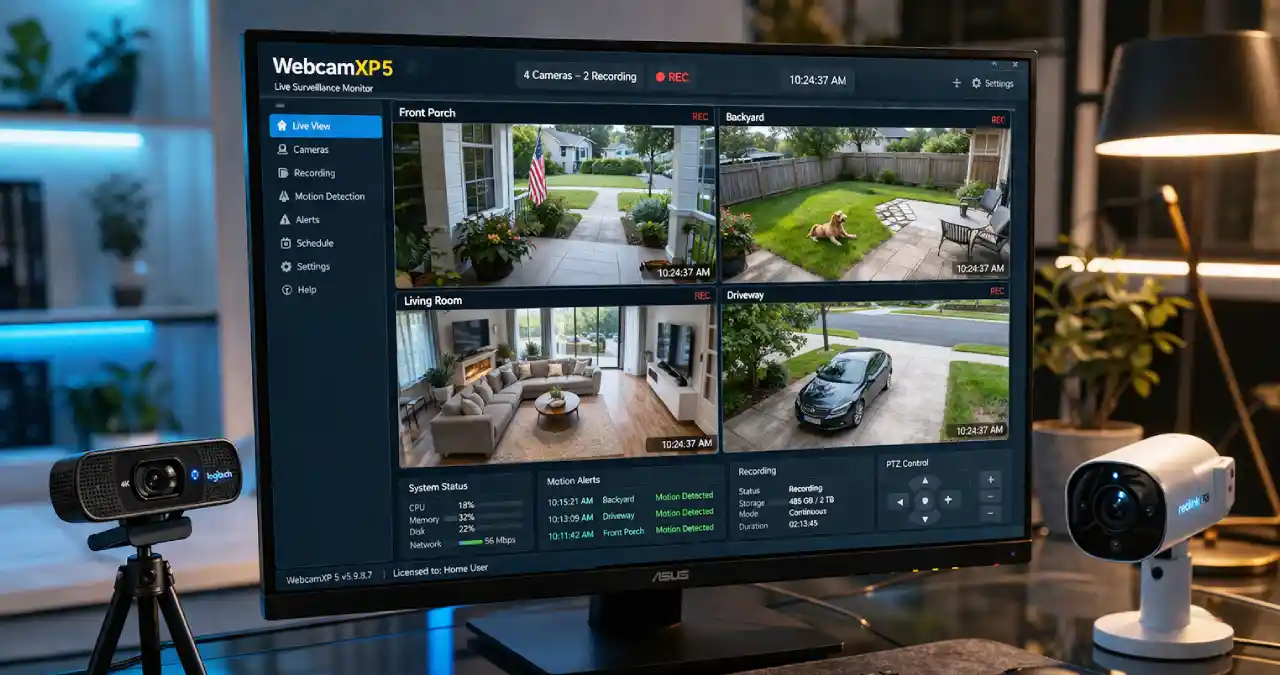
WebcamXP5 is a meticulously engineered Windows software built by Moonware Studios that can transform your PC into a webcam server for surveillance, streaming, and broadcasting. The well-known software assists businesses with their IP video-based surveillance needs.
The software’s easy setup makes it ideal for tracking your things from any location, in every nook and corner, with internet connectivity, allowing you to turn on the security feature on your computer system.
It does not matter whether you are yearning to opt for live video broadcasting via HTTP or looking for any alert detection through motion capture features; the software can handle everything flawlessly, even across distinct lighting conditions. Meanwhile, this makes it a versatile and on-the-go solution for better steaming and surveillance monitoring, is not so? Here in this Webtechhelp blog I will provide a breakthrough for what exactly WebcamXP5 is, its features, followed by a safety checklist, pros and cons, alternatives and much more. Read the blog to discover it.
What is WebcamXP5?
Do you really opt for a software application that can help you with security monitoring and surveillance purposes? Kudos to the developer for making a webcam that acts as a multifaceted functioning channel to record, monitor, and broadcast videos through live streaming with internet connectivity.
Standout Features of WebcamXP5
There are a plethora of standout features seen in the webcam XP5 as mentioned below with rationale.
Footage access
WebcamXP5 is a boon for users who have the authority to get instant help. Picture a situation. Supposedly, your children are alone at home, and there is an intruder who is trying to break in. This could mean trouble if you don’t have proper security cameras in place.
Here’s how WebcamXP5 develops as a saviour. With the help of this technology, any mishappenings that might be present can be prevented, and your home can be safe.
Communication
Suppose you are not present at your home, and there is also nobody to receive it. Now it’s really hard to manage such a situation, isn’t it? Now you think what’s next? This is where webcamXP takes apart.
At this hour, you could easily handle the matter with the delivery agent when they reach your door. You could easily communicate with the package agent and tell him how to secure your package. The built-in motion sensor feature of WebcamXP5 will allow you to watch and take care of every move of anyone who is moving closer to your home.
Property Break-ins
When you have the webcamXP5, then you don’t risk any break-ins. It’s been reported that people who have been using this software have had fewer break-ins. When you have a high-powered security camera that is surveilling the area 24/7, then it’s clear that people will be scared to break in.
Pet security
This software lets you watch how your pet functions in your home. This security camera has a feature known as the pet move. When enabled, it will track the activities of your pet and tell you where you can place your furniture that needs immediate attention.
Complete guide to download and install WebcamXP5
If you want the safest download for the tool, you are recommended to go to the official website. There are two options for downloading the software. You may select the webcamXP5 “Free version”, having a 13MB size, for a private & personal purpose. There is also an option to go for the “Paid version” of WebcamXP5, having a 16 MB size with more support options available.
Go through the steps mentioned below to know how to install the software in your system.
First, you need to download the software from the official site. After the download has been done, you are redirected to double-click on the downloaded file that will open the installation wizard. Now, clicking on the license term agreement, you are able to choose the installation folder on your device. Now click on the install option, and after it finishes installing, launch the WebcamXP5.
Is it safe or vulnerable – reality checklist?
WebcamXP5 can make your system vulnerable if the user cannot safeguard its security with proper configuration. The easier installation of the software by giving less attention to detail to safeguard the default security setting option may jeopardise the user’s security, making it hard to evade security threats. Leaving weak credentials set up as a default setting in WebcamXP5 opens up the backdoor for attackers to steal confidential information and put the system at risk.
Dorking also transforms the vulnerable situation from bad to worse. It may be seen that the authentication is primarily disabled, and hence keeping it unnoticed may make it easier for attackers to find your system IP details. Users need to be vigilant enough and set a strong alphanumeric password to protect the system from any unintended situation. Regular software updates also help to safeguard against any vulnerable consequences.
Pros and Cons
Based on user reviews and feedback, WebcamXP5 comes up with some pros and cons mentioned below in a table format.
| Pros | Cons |
| Easy and simple to use | Poor compatibility with Windows 10/11 |
| Good for basic remote viewing and monitoring | Limited features in the free version |
| Supports motion detection, recording & alertsLightweight | Better modern alternatives exist |
| Compatible with many USB/IP cameras | Many cameras leveraging it are easily found online |
Alternative to WebcamXP5
If you are opting for some alternative to WebcamXP5, let’s see the table mentioned below to know their features, what makes them the best fit for video surveillance, and their type, whether paid or free. Yawcam, iSpyConnect, ManyCam, Sighthound Video, and Blue Iris are some alternatives to WebcamXP5.
| Alternative to WebcamXP5 | Type-paid or open source | Key Features | Best For |
| Yawcam | Free | Webcam streaming, motion detection, HTTP/MJPG server, image capture | Simple webcam broadcasting & monitoring |
| Sighthound Video | Freemium | AI-powered detection (people/vehicles), easy setup | Smart AI surveillance |
| ManyCam | Freemium | Virtual backgrounds, effects, multi-source, streaming | Live streaming & video calls |
| iSpyConnect | Freemium | Motion detection, alerts, cloud storage, IP camera support, and AI features | Home security & remote viewing |
| Blue Iris | Paid | Advanced recording, AI object detection, multi-camera, mobile app | Surveillance for professional purpose |
How does webcamxp5 help business owners?
For any business owner, keeping a close eye on every move of every employee is not possible. Then there must be some way out that helps them to sort out the wrongdoing within the company to protect its reputation from erosion. This is where webcamXP5 is an instrumental weapon to safeguard the company from any disastrous happening. Let’s check out how.
Food Surveillance
There are thousands of incidents where the workforce suffered since the food department did not have surveillance. The pantry department did not present stale food out of intention, but even they did not know what they were doing since the surveillance camera was not in order. With the help of webcamXP5, this can be avoided.
Preventing a disgruntled employee from committing any wrongdoing
You might never know when an employee may turn their back on you. There may be some unscrupulous employees who steal the company’s belongings and act out of nowhere. This can be proven with the help of a surveillance camera, where you can watch the actions of any disgruntled employee and prevent any wrongdoings from happening in your company.
Employee productivity
Employee productivity is greatly strengthened when you have security surveillance. You can check the employer and their behavior. If they are sleeping, gossiping, and talking during company time, you can alert them by saying that they need to get back to work as soon as possible.
Customer attention
If you have a physical store, then using webcamXP5 is the need of the hour. You need to place the cameras at strategic locations so that you can see how a customer interacts with the products, and that can help you map the customer journey.
Wrapping up
In a nutshell, it is worthwhile to mention that WebcamXP5 is a software for surveillance and video streaming. If anyone opts for turning a Windows computer into a surveillance device, the software then serves as a boon for the purpose. The setup is easier and entirely flawless, making it ideal for usage. Meanwhile, the compatibility of the software with the distinct IP camera and USB makes it ideal for surveillance, streaming, and motion detection purposes.
Frequently asked questions (FAQs)
WebcamXP5 comes with a free version, although limited features are available in the free version.
Can’t guarantee it, but people who have used this application have found it safe and sound.
Yes, just attach the security camera to your premises, download their application, and you will be ready.