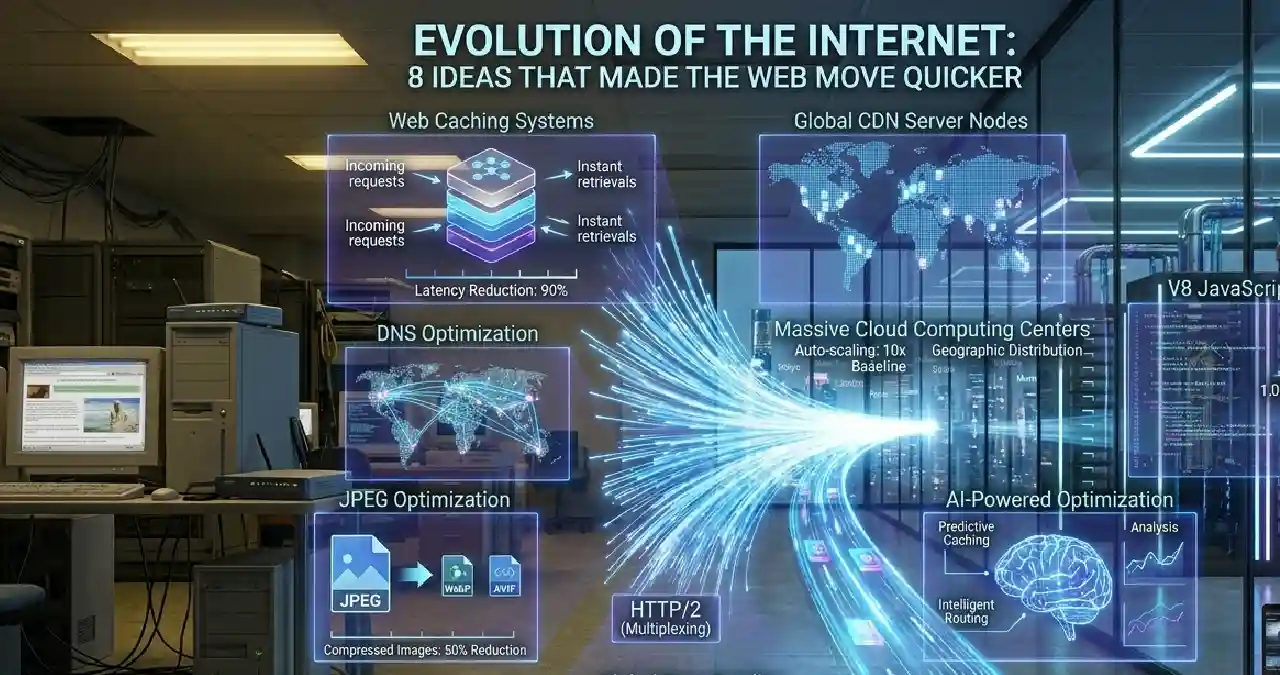
Can you imagine the internet breakthrough & technological growth that influences our daily tasks? From page loading on the browser to video streaming on a smart device, everything at present happens just at our fingertips. Everything that we are experiencing today did not happen overnight; it is the collective endeavour of smarter ideas and infrastructural breakthroughs that transform the impossible into something utterly possible.
Now the question is, if we flash back three decades earlier, everything was just beyond imagination. Read this Webtechhelp blog to get insight into tech ideas that made the web move quicker. This article explores the eight breakthrough technologies that transformed web performance from dial-up frustration to near-instant loading — explaining how each works, why it matters, and what impact it has on the websites and applications we use daily.
Early Days of Internet experience
If you think back three decades, something around the 1990s, the loading of a webpage on a browser was painfully slow and frustrating. A webpage with a few images takes around 30 to 60 seconds to load properly.
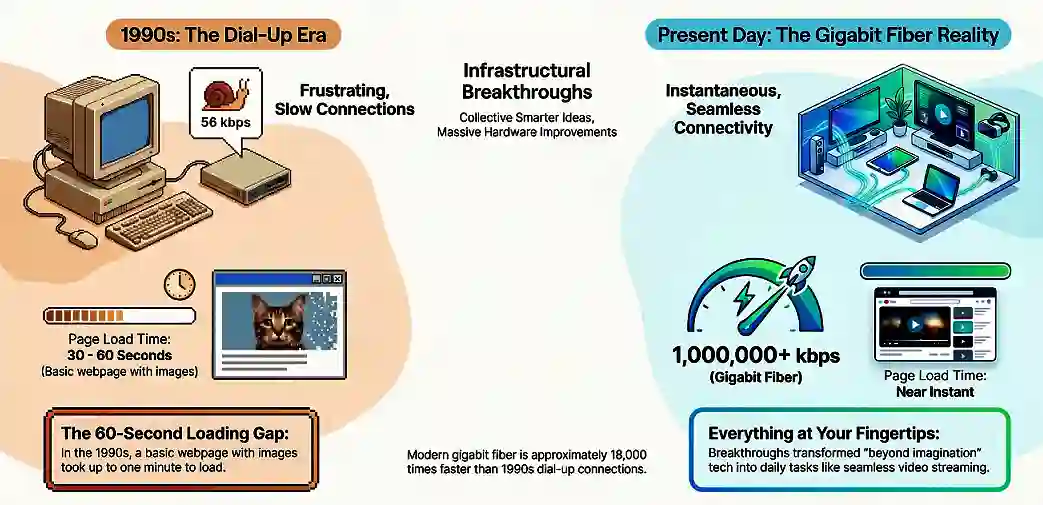
The user who has gigabit fibre internet connectivity today never connects to the pain users faced those days with Dial-up internet, giving 56 kbps speed, approximately 18,000 times slower than the present.
Technologies That Changed Everything
There has been no single invention that can provide promise for faster web loading. Any changes come from distinct types of innovation that can solve different types of puzzles. Lets check that tabular data to know the innovation timeline and how everything changes at a slow pace, but in continuation from the 1990s to the present 2020s.
Timeline of innovation
| Decade | Key Shifts | Major Technologies | Impact on Web Performance |
| 1990s | Static Pages & Dial-Up | Static HTML, basic GIFs, HTTP/1.0 | Limited by slow modems, pages loaded one asset at a time with high latency |
| 2000s | Broadband | Broadband rollout, CMS JavaScript, AJAX, and early CDNs | Faster connections enabled interactive sites with reduced reloads for full-page |
| 2010s | Mobile-First, Cloud & HTTP/2 | Smartphones (3G), cloud platforms, HTTP/2 | Handled mobile constraints, better multiplexing, and global delivery |
| 2020s | Edge Computing, AI & HTTP/3 | Edge computing, HTTP/3 + QUIC, AI-driven optimization | Faster & more reliable connections, automated tuning for performance |
8 Tech Ideas You Need to Know
Content Delivery Networks
Among the multiple reasons behind faster and quicker content loading, Content Delivery Networks are one of them, acting as a standout solution to mitigate the distance problem. The CDN acts as a solution credible enough to store myriad copies of the website asset in multiple locations. Now the question arises, how does it works is not so? When someone visits a website, the content from the server in proximity is delivered. A content delivery network (CDN) is a group of servers that are geographically distributed and expedite web content delivery close to the users. It indeed helps to reduce the latency and ensure faster loading of content. Let’s make me simplify this for you.
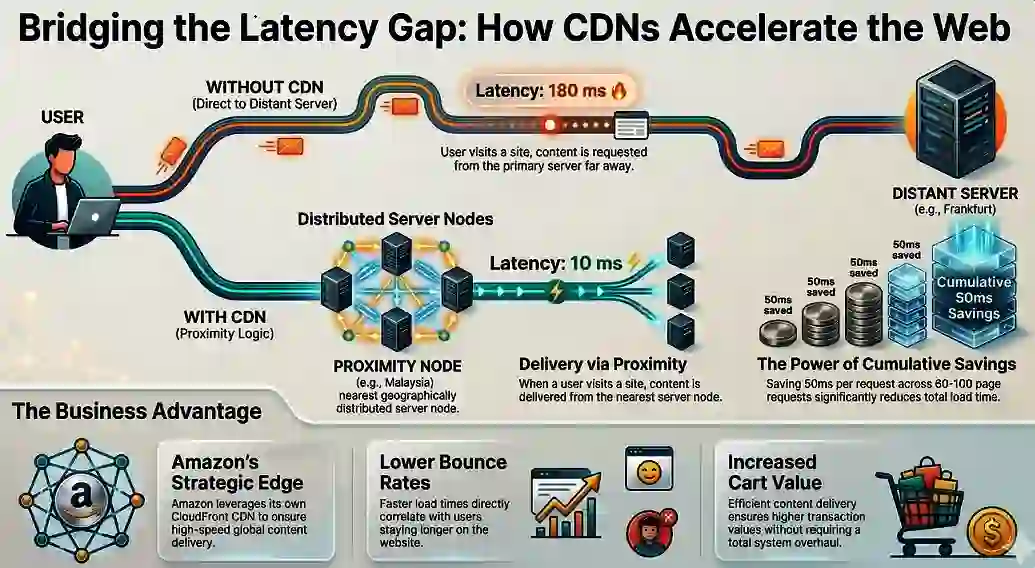
Supposedly, a visitor in Lucknow requesting the CDN node in Malaysia requires waiting around 10 milliseconds, unlike someone from the server in Frankfurt, taking, for example, 180 milliseconds. In isolation, the distinctions seem trivial, but when considering the bigger picture, it reveals how they help to save load times.
A typical webpage makes between 60-100 individual resource requests. A 50ms saving per request, across 100 requests, represents a potential 5-second reduction in total load time. For e-commerce sites, Akamai research shows that a 100ms delay reduces conversion rates by 7% making CDN implementation one of the highest-ROI performance investments available.
Amazon’s proprietary CDN (Amazon CloudFront) processes billions of requests daily, ensuring sub-100ms delivery to users worldwide. Google, Netflix, and Facebook all operate custom CDN infrastructure for the same reason: geographic distance is the fundamental enemy of web performance, and CDNs are its most direct solution.
DNS Optimization
DNS is the initiation point for any web request before anything can materialise or happen in reality. Let’s take a scenario. Supposedly, a browser meets with a domain name, then what would happen?

Before opening a connection, applying for other important technologies, and triggering an event with CDN, the first task is to convert them into an IP address for further proceeding. To replenish the latency gap or delay DNS optimisation stands out as an ideal process between user typing for a web address & depending on the web and server connecting via browser.
Ways to optimize DNS performance
| Technique | What It Does | Key Benefits | Implementation Effort |
| DNS Prefetching | Browser resolves domain names in the background using a simple HTML hint (<link rel=”dns-prefetch” href=”//example.com”>) before the user clicks or requests resources. | Eliminates DNS lookup latency for third-party domains. | Very Low (just add one HTML tag) |
| Browser DNS Caching | Browsers and OS cache DNS results locally for repeat visits. | Repeat visits load much faster with zero external DNS lookups. | Automatic |
| Anycast Routing + Fast DNS Providers | Routes DNS queries to the nearest server worldwide. | Dramatically reduces lookup time. | Low |
| DNS over HTTPS (DoH) | Encrypts DNS queries over HTTPS instead of plain UDP. | Improves privacy & security. Faster due to connection reuse. | Low |
Image Data Compression
It is often seen that some websites load faster, not because they are embedded with an incredibly powerful network connection, but for the smaller file size that loads faster over the network.

Now the question that sticks with you is, why does this happen, or what’s the exact catch behind it? It’s all about data compression that acts as a gateway for webpage speed optimisation. Let’s consider the image for a webpage. Unoptimized images act as a deterrent, slowing down the page speed and necessitating the need for image compression.
Benefits of compressing images
Image compression is not only a mere technical functionality improvement, but it is a staple for improved accessibility and usability. Supposedly, you are navigating a site that looks fine with your office internet connectivity, but the same site lags when accessed via mobile, and sometimes becomes slow or unresponsive. That’s all about image compression that engulfed 40-60% of the total data weight of a webpage.
| Parameter | Traditional (JPEG/PNG) | WebP (2010) | AVIF (2019) | Key Benefits |
| File Size | Baseline (e.g., 800 KB for a full-width image at retina resolution) | 25-35% smaller than JPEG | ~50% smaller than JPEG ~20% smaller than WebP | Dramatically reduces page weight (images = 40-60% of total data) |
| Compression Technology | Older prediction & entropy coding | Advanced prediction + entropy coding | Based on the AV1 video codec | Better efficiency for modern high-resolution screens |
| Features | JPEG: No transparency PNG: Transparency but poor compression | Transparency + Animation | Transparency + Animation + Superior quality | Replaces the need for multiple formats |
| Encoding Speed | Fast | Faster than AVIF | Slower (better for pre-rendered assets) | WebP preferred for dynamic/real-time use |
| Impact on UX | High bandwidth usage | Faster loading | Best-in-class loading speed | Better Google metrics, lower bounce rates, improved mobile experience |
Web Caching
Every time a new user visits a website for some purpose, the browser of the site already keeps the files’ information and downloads them. It does not matter whether they are JavaScript files, fonts, images, or any CSS stylesheets; the Web caching instructs the browser to locally save them. It indeed makes them not essential for future downloads even after the user visits the site for the second time.
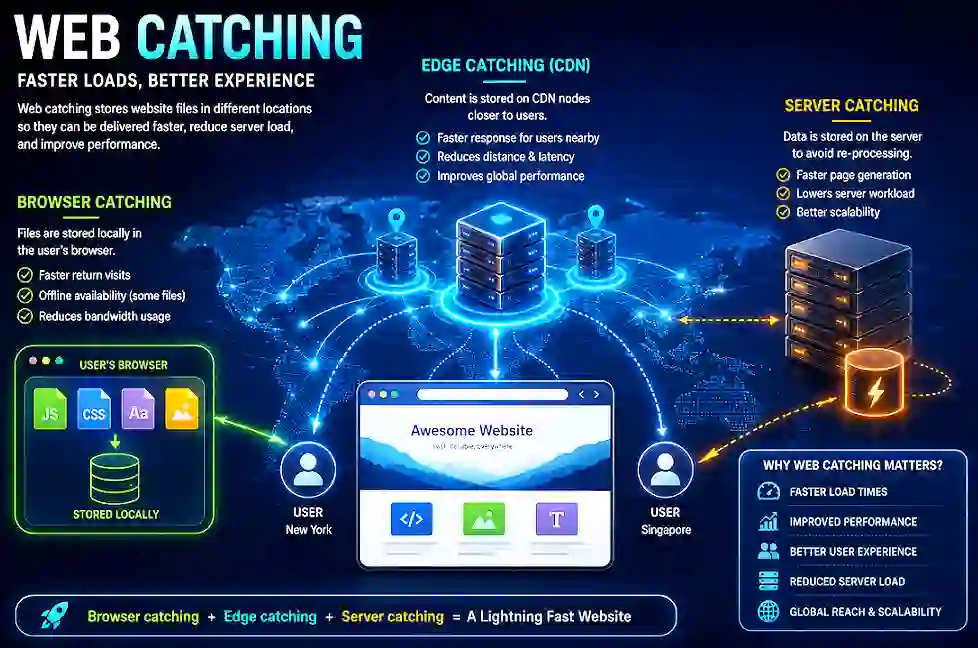
Caching is generally of three types, namely Browser caching, edge and server caching. Each of them works collectively; they serve an important purpose for webpage performance optimisation. Browser caching saves the file locally on the device, while edge caching stores necessary content on CDN nodes to provide a faster response to the user nearby. To avoid the need for re-processing, server caching plays an invaluable role. If you consider a site with higher traffic, catching is invaluable, not just something optional.
HTTP/2 and HTTP/3
Exchanging data between servers and browsers is made possible due to the communication protocol known as HTTP. HTTP/1.1 is the original version that has certain limitations capable of handling one request per connection at a time. Let’s understand the catch. Supposedly, a page had 25 files that needed to be loaded. What does the browser do then? It had to wait for each one in line to make the thing done. Now the question is, is there any upgrade of HTTP that solves the trouble? Certainly, yes.
HTTP/2 with multitasking credibility can allow the sending of multiple files over a single connection at a time. The transition from HTTP/1.1 to HTTP/2 in the year 2015 is a significant leap in the tech world, considered a gateway, making the web move more quickly. Besides, it supports server push and header compression, enabling servers to transmit files even before they are requested. Embracing HTTP/2 significantly drops the load times. After the emergence of HTTP/3, it ensures even faster and more stable performance, even in unstable mobile connectivity, facing frequent packet drops. It is the breakthrough or most innovative tech ideas that made the web move quicker. HTTP/3 builds on the QUIC transport protocol, significantly reducing connection setup time and more effectively handling network interruptions.
Cloud Computing
The perfect orchestration of infrastructure and technology-mediated service led by cloud computing offers something that is truly unmatched in terms of efficacy. In early times, every website was reliant upon a single physical server. Now the question arose: what happened then? It would indeed lead to a glitch for the website when the server faced downtime, and a rise in traffic is seen. This is somewhat fragile and slower network infrastructure. Embracing the cloud has brought forth a myriad of changes that are truly revolutionary.
Cloud computing transforms web performance through two mechanisms that physical servers cannot replicate:
Auto-scaling: When traffic spikes — a product going viral, a news event, a sale launch — cloud infrastructure automatically provisions additional server capacity within seconds. A physical server would crash under the same load.
Geographic distribution: Cloud providers like AWS (33 regions), Google Cloud (40+ regions), and Azure (60+ regions) host applications simultaneously across the globe, serving users from the nearest data center.
Real-world example: When Twitter experienced the ‘Super Bowl effect’ — massive simultaneous traffic spikes during major events — its migration to cloud infrastructure allowed it to scale from baseline capacity to 10x baseline in minutes rather than hours. Traditional data center scaling would require hardware procurement measured in weeks, not seconds.
JavaScript Engines
A browser once acts as a single viewer of a document. It was indeed unable to run audio synthesis, complex applications, 3D graphics, and machine learning models simultaneously. Modern browsers are becoming a boon that come up with sophisticated platforms capable of handling everything that was once hard to believe.
The introduction of Google’s V8 engine in 2008 fundamentally changed JavaScript performance. Instead of interpreting code line by line (slow), V8 compiles JavaScript directly to machine code using Just-In-Time (JIT) compilation (fast).
The real-world impact: JavaScript operations that once took 1,000 milliseconds now execute in under 1 millisecond — a 1,000x performance improvement. This transformation made JavaScript viable for:
- Real-time applications (Google Maps, Gmail)
- Complex web apps (Figma, VS Code in browser)
- Server-side applications (Node.js)
- Machine learning inference in browsers (TensorFlow.js)
Mozilla’s SpiderMonkey and Apple’s JavaScriptCore engines followed with comparable innovations, creating a competitive ecosystem that continues to push JavaScript performance forward through successive browser versions.
AI-Powered Optimization
In terms of Intelligent Routing, Automated Optimization, and Predictive Caching, there are myriad benefits led by AI-Powered Optimization. It also has also real world impact that is enumerated below with justification in tabular format.
| Optimization Area | Traditional Limitation | AI-Powered Benefit | Real-World Impact |
| Predictive Caching | Caches only after request | Predicts & pre-loads based on patterns | Netflix: Substantial reduction in video start wait time via ML models on viewing history. |
| Intelligent Routing | Picks the lowest latency at the instant | ML analyzes history + real-time for best path | Cloudflare Argo: Capable of bringing forth average latency reduction (TTFB). |
| Automated Optimization | Manual expert tuning | Analyzes content & auto-applies (images, lazy load, etc.) | Faster LCP/FCP (e.g., Chrome prefetch) scales personalization & efficiency. |
Wrapping up
The revolution of the webpage that at present move incredible quicker than a few decades before does not happen overnight. The smarter version of HTTP is a breakthrough that brings forth a significant reduction in connection inefficiency. The compression of the image file lessens the time taken for page loading and expedites the page loading speed. CDNs are another boon that brings content physically in proximity to the users. Whatever digital experience we are witnessing these days is the collective endeavour of smarter ideas and technological breakthroughs.
FAQs
CDNs deliver the highest immediate impact, reducing Time to First Byte by 50-75% for global audiences through geographically distributed servers. However, implementing all eight technologies together provides the best overall results.
HTTP/2 (2015) introduced multiplexing, allowing multiple files to transfer simultaneously. HTTP/3 (2022) uses the QUIC protocol for faster connection establishment and better mobile performance, eliminating “head-of-line blocking” where lost packets delay other data.
Significantly, images account for 40-60% of webpage data. WebP reduces file size by 25-35%, while AVIF reduces it by ~50% compared to JPEG. For a 2MB image webpage, this saves 700KB-1MB per load, improving speed and Core Web Vitals scores.
Three caching layers—browser, CDN, and server—work together to reduce page load times by 50-90% for returning visitors and server load by 80%+ for high-traffic sites.
CDNs store static assets on geographically distributed servers and route user requests to the nearest server, reducing latency and speeding up load times regardless of location.
JIT compilation converts JavaScript directly to machine code at runtime instead of line-by-line interpretation, dramatically improving execution speed and enabling complex web applications.
DNS prefetching pre-resolves domain names in the background using an HTML tag, eliminating DNS lookup latency when external resources (fonts, scripts, media) are actually needed.
AI improves performance through predictive caching (pre-loading resources based on user behavior), intelligent routing (selecting optimal data paths), and automated optimization (applying compression and lazy loading without manual intervention).