

Imagine you need the price of 500 products from an online shop, or every job ad in your city from a careers site. Copying them by hand would take days. List crawling does it in minutes.
In this guide I’ll explain what list crawling is, how it works step by step, which tools to use, and the legal and ethical rules you need to follow.
What is list crawling?
List crawling is a type of web scraping that collects the same pieces of information from a list of similar pages, such as product listings, job ads, directory entries or reviews.
There are two parts:
- Crawling: finding and visiting the pages, for example by following “next page” links or working through a list of URLs
- Scraping (extraction): pulling out specific fields from each page, such as name, price, rating or location
The result is a clean table (often a CSV or spreadsheet) you can analyse.
What sites work best?
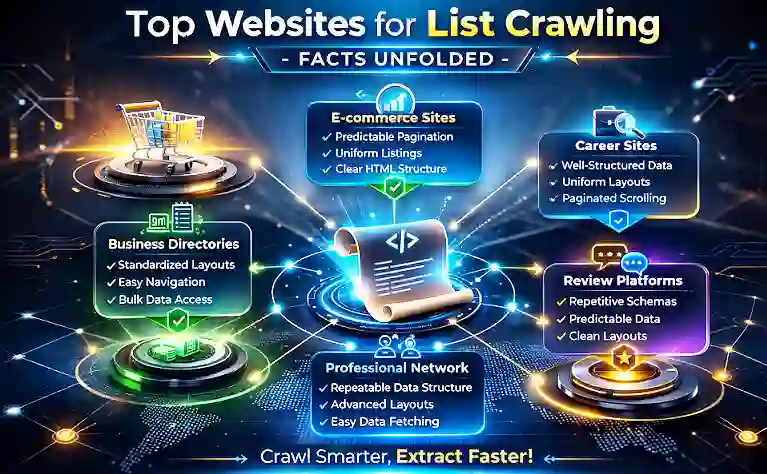
List crawling works best on pages with a consistent structure:
| Type of site | Example data |
|---|---|
| E-commerce category pages | Product name, price, stock, rating |
| Job boards | Job title, company, location, salary |
| Business directories | Business name, address, phone, category |
| Review sites | Rating, review date, review text |
| Event listings | Event name, date, venue |
Sites that load content with JavaScript, use infinite scroll or have strong anti-bot protection are harder to crawl and may need more advanced tools.
How does list crawling work?
- Define your goal. Decide exactly what data you need and why.
- Check permission. Read the site’s terms of service and robots.txt (more on this below). Look for an official API first. It’s often easier and allowed.
- Build your list of URLs. Start from a category or search page and collect the links to each item, or follow pagination.
- Choose your fields. Identify where each piece of data sits on the page (using HTML elements or CSS selectors).
- Run the crawl politely. Add delays between requests and limit how many pages you fetch at once.
- Clean and store the data. Remove duplicates, fix formats and save to CSV, a spreadsheet or a database.
- Analyse it. Compare prices, spot trends or build reports.
Best list crawling tools
| Tool | Best for | Skill level |
|---|---|---|
| Scrapy | Large, custom projects (Python framework) | Developer |
| Octoparse | Point-and-click scraping, cloud runs | Beginner to intermediate |
| ParseHub | Point-and-click, handles some dynamic sites | Beginner |
| Browser extensions (e.g. Web Scraper) | Small, quick jobs | Beginner |
If you’re choosing a programming language for scraping, Python is the most common choice. My comparison of Java vs Python covers why.
Real-world uses
- Price monitoring: a small shop tracks competitors’ prices weekly.
- Market research: a startup counts how many job ads mention a certain skill.
- Lead lists: a business builds a list of companies in a directory (while following data-protection rules).
- SEO research: marketers check which pages rank and how competitors structure their content. See People Also Search For for one SERP feature worth tracking.
Is list crawling legal?
It depends on what you collect, how you collect it and where you are. I’m not a lawyer, but these are the key points to know:
- Terms of service. Many sites forbid scraping in their terms. Breaking them can lead to bans or legal claims.
- robots.txt. This file tells crawlers which parts of a site to avoid. Google describes it as a way to manage crawler traffic, and a US court in December 2025 described its rules as “merely requests” rather than technical access controls. Even so, respecting it is good practice and shows good faith.
- Personal data. Collecting information about people (names, emails, phone numbers) can fall under privacy laws such as the GDPR. Be very careful here.
- Copyright. Facts such as prices are usually fine to use. Copying whole articles, images or reviews to republish is not.
Responsible crawling checklist
- ✅ Use an official API if one exists
- ✅ Respect robots.txt and the site’s terms
- ✅ Add delays and keep request volume low
- ✅ Identify your crawler honestly (user agent)
- ✅ Collect only the data you need
- ❌ Don’t scrape personal data without a lawful basis
- ❌ Don’t bypass logins, paywalls or CAPTCHAs
Frequently asked questions
What’s the difference between list crawling and web scraping? List crawling is a kind of web scraping focused on collecting the same fields from many similar pages.
Do I need to code to do list crawling? No. Tools like Octoparse and ParseHub are point-and-click. For big or complex projects, coding with Scrapy gives more control.
Can websites block list crawlers? Yes. Sites can block crawlers using rate limits, CAPTCHAs and bot detection.
Is it legal to scrape prices from a website? Often, if you follow the site’s terms and don’t overload it, but rules vary by country and site. Get legal advice for commercial projects.
Related guides on WebTechHelp
- Java vs Python: which language will reign supreme?
- Is a data analyst worth the investment?
- What challenges does generative AI face with respect to data?
Sources
- Google Search Central: Introduction to robots.txt
- Eric Goldman, Technology & Marketing Law Blog: Are robots.txt instructions legally binding? Ziff Davis v. OpenAI (December 2025)
- Scrapy: Official site