

Workflow scheduling by dint of manual planning may have seemed functional a few decades back, but now necessitates a smarter approach to managing workforce demand. The market for global workflow management has skyrocketed in recent times, with a projected value of USD 86,631.2 million by the end of 2030.
Without having the right tool in hand, managing the workforce scheduling becomes an arduous task to handle. This is why the need for the UGE Schedule Source becomes a wake-up call for managing the scheduling without any burnout and recurring costs for compliance penalties.
Managing the activity of a larger team seems intimidating for managers to handle, as it requires a centralised system to track time, staff schedule, and workforce coordination, demanding the need for a multi-location set-up to simplify the process. Here in the blog, let’s delve into an overview of Schedule Source UGE, its core features, login, download, and troubleshooting guide, and much more.
What is Schedule Source UGE?
Schedule Source UGE is a meticulously crafted platform designed for workforce management in a cloud-based way, helping firms to handle employee scheduling, organising plans and assigning tasks in a multi-location set-up. The platform is aiming to make a centralised hub for managers to assist them in scheduling, swapping shifts among employees, and tracking the data in real time.
Core Features That Matter
The system is well-versed with some standout features that make it appropriate for task handling at both managerial levels and in times of employee need.
| Core Feature | Brief Summary |
| Scheduling Tools | The scheduling tools are assisting managers in creating recurring shifts for employees. |
| Template for better task handling | Templates are invaluable in this aspect and help managers to make quick & subtle changes with drag-and-drop functionality. |
| Leave tracking | Digital submission and approval of leave requests are easily done through automatic updates. |
| Payroll management | Payroll management is made easy with the aid of technology to reduce the need for manual handling of tasks & error reduction. |
| Shift Swapping | Enables employees to swap shifts with their colleagues by dint of built-in request tools. |
| Tracking attendance periodically | Accurate tracking made easy with time clocks and through the help of mobile check-ins, guaranteeing better compliance and monitoring of activities in real time. |
Login, Download and Troubleshooting Guide
How to Login
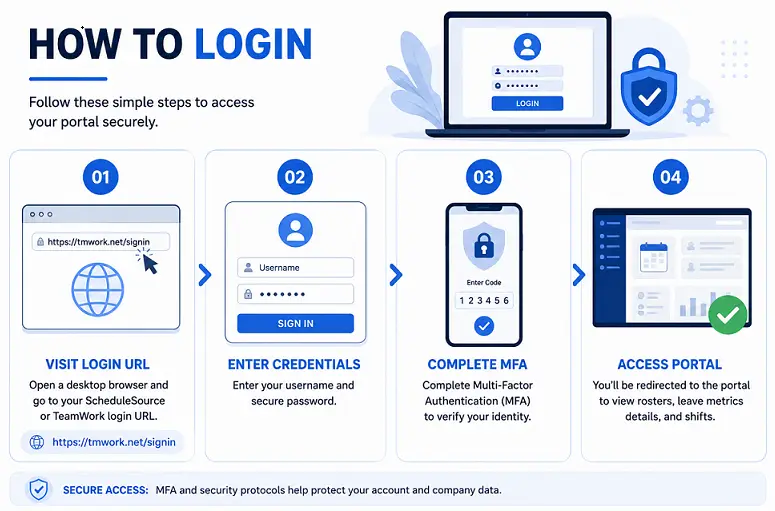
- To log in to the website, you need to visit the login URL from a desktop browser. To access the portal, visit the custom ScheduleSource or TeamWork login URL by clicking on the link https://tmwork.net/signin via a desktop browser.
- Now you need to enter your login credentials, put your username and secure password to proceed next.
- Complete the Multi-Factor Authentication (MFA) steps to evade any breach or safety compromise per the security protocol led by the company.
- Once logged in, you will be redirected to access the portal in order to view rosters, leave metrics details and shifts.
Download ScheduleSource TeamWork (iOS Users & Android Users)
| Downloading guide for the UGE platform | |||
| Mobile-First ESS (Employee Self-Service) | iOS Users | Android Users | System Requirements |
| The UGE platform relies on a mobile-first framework for vacancy claiming. | Open the Apple App Store, search for ScheduleSource TeamWork, and tap download. | Open the Google Play Store, look up the official client app, and install it on your device. | Your phone must meet the system requirement benchmark for running it, which has a compatible OS version, to preserve real-time push notification syncs for roster shifts. |
Troubleshooting guide
Users may come across login errors, sync delay & missing shifts, failures to receive push notifications and permission constraints. Let’s have a look at the troubleshooting guide to know how to mitigate them.
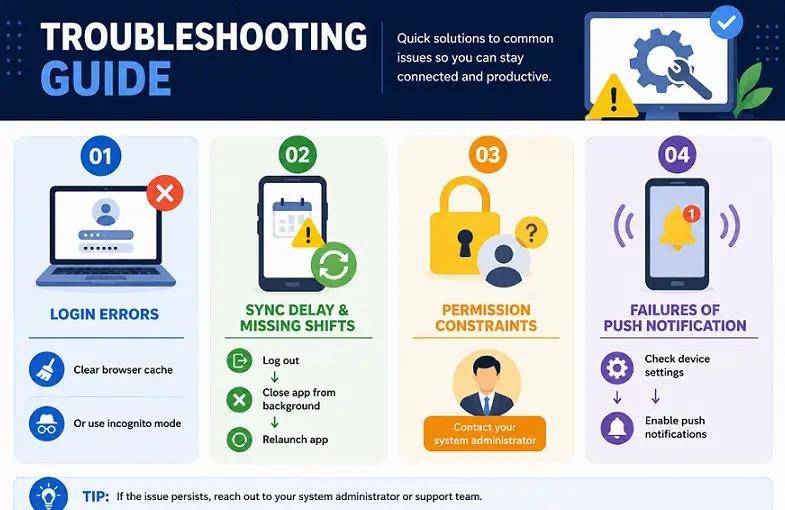
- Login Errors: You need to clear the cache of your internet browser or switch to an incognito mode from your window if the platform fails to proceed with the credential details.
- Sync Delay & Missing Shifts: If shift swaps do not appear on your device screen, you need to log out of the app, close it from the background and relaunch it.
- Permission Constraints: If you see that the vacancy claims are entirely locked out, you need to verify with details of your system administrator. Meanwhile, the system administrator will shed light on whether the role, skill tags, and weekly hours constraints are mapped properly or not.
- Failures of push notification: Mobile device system settings need to be checked to confirm whether push notifications are explicitly enabled or not for the application.
Bottom line
Schedule Source UGE is an on-the-go solution for a workforce management methodology designed to simplify employee scheduling, attendance tracking, and shift coordination. Kudos to the maker for creating a platform that offers cloud-based access, mobile support, and self-service tools.
Additionally, it acts as a catalyst to improve workforce efficiency while lessening the workload associated with administrative task handling. It is a boon that offers a practical solution for modern workforce scheduling, no master whether you are a manager overseeing multiple locations or an employee checking for upcoming shifts.
Frequently asked questions (FAQs)
Ans: Schedule Source UGE is a platform designed for workforce management in a cloud-based way, helping firms to handle employee scheduling and organising plans.
Ans: You need to click on the URL of the official login portal by clicking on the link https://tmwork.net/signin. Next, enter your username and password and finish the MFA verification process in order to access your dashboard.
Ans: Yes. Employees can access the platform from both their Android and iOS applications.